Chat with us

Digital menus for cafés, restaurants, bars and hotels

Change a price. It's live before the coffee cools.

Guests scan a QR code and read your menu in their own language. No app to install. You edit it from your dashboard, and the printed code never changes.

Got a paper menu? Upload it and AI types it in.

30 days free. No card needed.

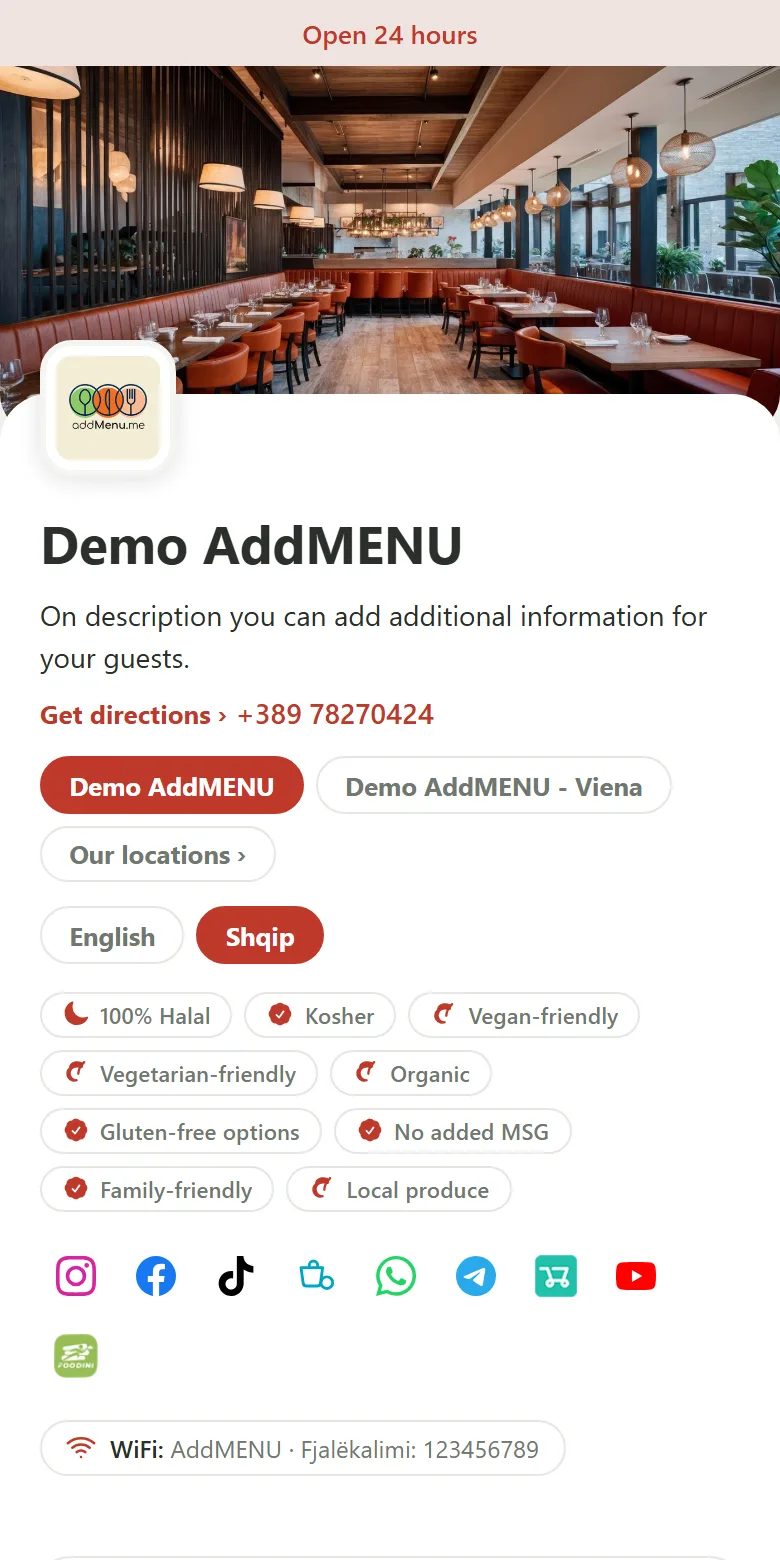
What a guest sees first: the venue, opening hours, languages and the menu categories
  • 185menu languages
  • 30 daysfree trial, no card needed
  • 1 QR codeper table, and it never changes
  • EU-14allergens on every dish

How it works

Three steps to a live menu

  1. Create your account

    Sign up and name your business. Your free trial starts straight away.

  2. Build your menu

    Add categories and dishes, set prices, upload photos and drag everything into order.

  3. Share your QR code

    Download the print-ready sheet and put the codes on your tables. Guests scan and read.

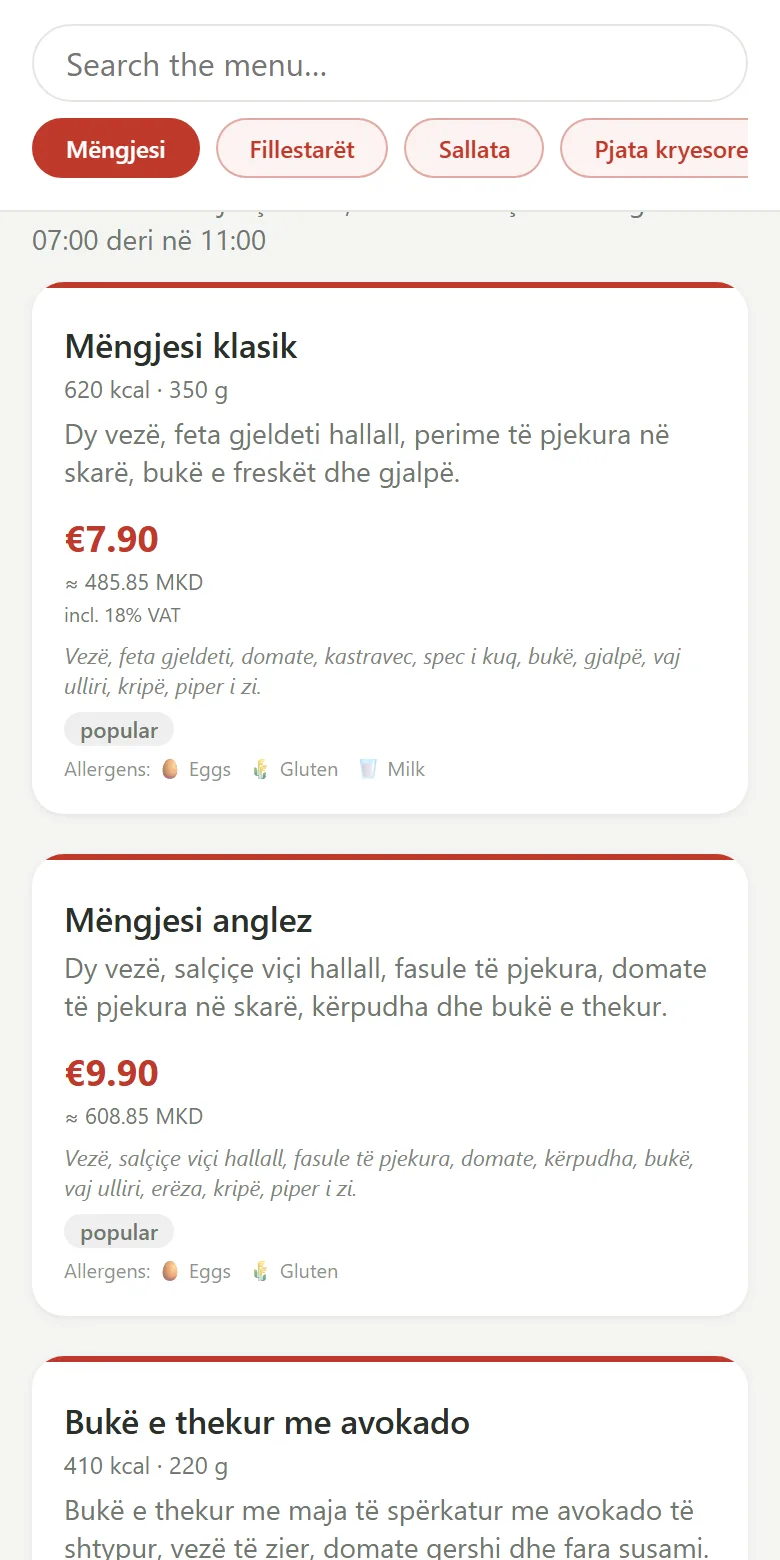
The demo menu on a phone: dishes with prices, calories and allergens

Build your menu with AI

Got a printed menu? Upload it. AI types it in.

Take photos of your paper menu or upload the PDF. AI reads every category, dish, description and price and builds the menu for you. You check it, then import it.

  1. Upload

    Up to 5 photos (JPG, PNG or WebP), or one PDF of up to 16 MB.

  2. AI reads it

    Categories, dishes, descriptions and prices, in the language your menu is written in. Dietary tags and allergens are picked up only when your menu marks them. Nothing is guessed.

  3. You review

    Every name, description and price is editable. Untick what you do not want. Prices are read in your currency.

  4. Import

    Add it to a new menu or to one you already have. Nothing is saved until you press Import.

  • Photos
  • PDF
  • Vegan, vegetarian, gluten-free, lactose-free, spicy
  • EU allergens
  • Then translate it with AI

How many AI imports you get each month depends on your plan.

Import a menuPhotosPDF
AI is reading your menu
Starters
Bruschetta6.50Tomato, basil, garlic, grilled breadVegetarianGluten
Grilled calamari9.00Lemon, parsley, olive oilMolluscs
Spicy chickpea soup5.50Chickpeas, chilli, cuminVeganSpicy
Add to: + Create a new menuImport selected

An example. You see and can edit every line before anything is imported.

Everything in your dashboard

Every tool a menu needs, in one place

One account runs the menu, the languages, the QR codes and the branches. This is what is inside.

  • Menu builder

    • Categories and dishes, dragged into order
    • Photos for dishes and a banner for each category
    • Sale prices, with the regular price struck through
    • Sizes with their own prices, and paid extras
    • Mark a dish sold out, or count stock down and hide it at zero
    • Several menus, each shown on the days and hours you choose
  • Allergens and dietary info

    • The 14 EU allergens on every dish, and your own to add
    • Your own icon for each allergen
    • Tags for vegan, vegetarian, gluten-free, lactose-free and spicy
    • Calories, portion size and preparation time
    • Ingredients and a spice level
  • Languages and AI translation

    • Translate your menu into any of 185 languages with AI
    • Read the AI draft, change it, then publish
    • Guests switch language on the menu itself
    • Rename the menu’s own words, like the buttons and labels
  • Money and opening hours

    • Your currency, plus a second one with its own rate beside every price
    • Opening hours and a live “Open now” status
    • Timezone set for each branch
  • Your brand

    • Your logo and a cover photo
    • Your brand colour, plus colours and fonts, with a live preview
    • Trust badges: Halal, Kosher, Vegan-friendly, Organic and more
    • Social and delivery links, each with its own icon
    • Guest WiFi shown on the menu
  • QR codes and print

    • A code for every table, wall or location
    • Design it: colours, gradients, dot and corner styles, your logo in the middle
    • Frames and labels, downloaded as PNG or SVG
    • A print-ready A4 sheet of table cards
    • Change the design any time: the code still opens the same menu
  • Branches

    • Each branch has its own menu link, QR codes, contact details and hours
    • Share one menu and change a price or hide a dish at one branch
    • Or give a branch its own copy of the menu
    • A map pin with “Get directions”, and a public list of your branches
    • Managers who see only the branches you pick
  • Offers and happy hour

    • An offer popup with a banner, featured dishes and a link
    • Happy hour: an automatic percentage off on the days and hours you set, even overnight
    • Choose the menus and the branches it applies to
    • Prices go back to normal on their own when it ends
  • Insights and feedback

    • Menu views and QR scans, day by day
    • By branch, by QR code and by country
    • Counts only: no cookies and no tracking of your guests
    • Star ratings and comments from guests, anonymous
  • Your own address

    • Your own domain, like menu.yourrestaurant.com
    • Search engine settings: title, description, keywords, share picture and icon
    • Pick your menu’s web address
    • A photo library: upload once, use everywhere, drag to order the gallery
  • Team and access

    • Invite managers and staff by email
    • A role for each person
    • Limit a manager to some branches
    • Or add someone directly and set their password yourself
  • Help, alerts and billing

    • Alerts in the app, and on your phone if you want them
    • Support tickets and replies without leaving the dashboard
    • A help centre with step-by-step guides
    • Your plan, invoices and payments in one place

Try it now

This is not a mockup. Tap it.

The phone shows our real demo menu, running right now. Scroll it, open a dish, change the language and the branch, and see what your guests would see.

Or scan this code and open the demo on your own phone. Open it in a new tab
The demo menu on a phone

    Simple pricing

    Try every feature free for 30 days. No card needed.

    Digital Menu

    €99/year

    • Unlimited menus
    • Unlimited menu items
    • Unlimited QR codes
    • Unlimited locations
    • Unlimited menu views
    • Item photos
    • addMenu link in the footer
    • Your own custom domain
    • Translations, themes, analytics & feedback

    Start free trial

    At a glance

    The facts about addMenu

    What it is
    addMenu is a digital QR menu for cafés, restaurants, bars and hotels. Guests scan a code and read the menu in their browser: no app to install.Source: the addMenu demo menu
    AI menu creation
    Upload up to 5 photos or one PDF of up to 16 MB and AI builds a draft menu. You check and edit every line before anything is imported. The number of AI imports per month depends on your plan.Source: the addMenu dashboard
    Free trial
    Try every feature free for 30 days, with no card needed. The price is shown in the pricing section of this page.Source: this page
    Languages
    Translate your menu into any of 185 languages with AI, read the draft, change it, then publish. Guests switch language on the menu itself.Source: the addMenu dashboard
    Allergens
    You mark the 14 EU allergens on every dish, and add your own if you need to.Source: EU Regulation 1169/2011
    Branches
    Each branch has its own menu link, QR codes, contact details and opening hours. Share one menu across branches, or give a branch its own copy.Source: the addMenu dashboard
    QR codes
    The printed code never changes: edit the menu, its prices or the code's design at any time and the same code still opens the same menu.Source: the addMenu dashboard
    Your own address
    Put the menu on your own web address, like menu.yourrestaurant.com.Source: the addMenu dashboard
    Guest privacy
    Menu views and QR scans are counted by day, branch, QR code and country. Counts only: no cookies and no tracking of your guests.Source: the addMenu dashboard

    Questions

    Do my guests need to install an app?

    No. They point their phone camera at the QR code and the menu opens in the browser. Nothing to download, no account.

    How do menu updates work?

    You edit the menu in your dashboard and save. The public page updates immediately. The printed QR code points to a fixed address that never changes.

    Can I have more than one venue?

    Yes. Add as many locations as your plan allows. Each can share a master menu or run its own prices, items and QR codes.

    Which languages are supported?

    You can translate your menu into any of 185 languages and let guests switch. The menu can also open in the visitor's language automatically, based on their country.

    Can I use my own web address?

    Yes, on plans that include a custom domain. You can serve the menu from your own domain, and give each branch its own.

    Is the free trial really free?

    Yes. Try every feature free for 30 days, with no credit card required. Subscribe at any time during the trial and keep your remaining free days.

    How do I pay?

    It is an annual subscription. When you subscribe, your dashboard shows the payment methods available to you. Nothing is charged during the free trial.

    Put your menu on the table

    30 days free, no card needed.